


OpenToon - Manga Translator
4.5151.00 Reviews
App Specs
- Version
- 1.1.4
- Updated On
- License
- Free
- Downloads
- 50,000+
- Developer
- OpenNovel
- Categories
- Comics
- Platform
- Android
Screenshots
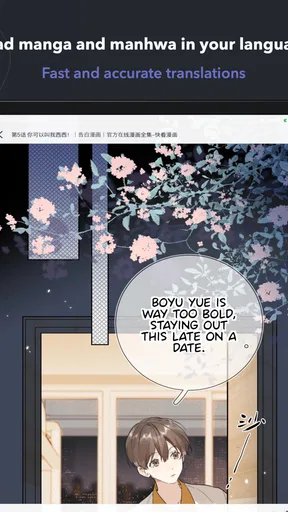
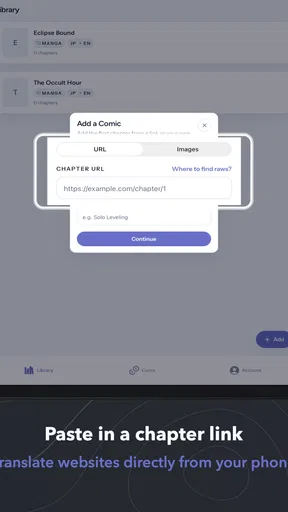
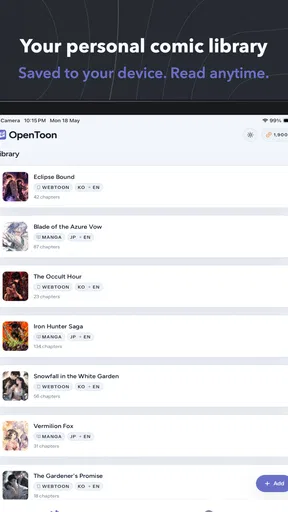
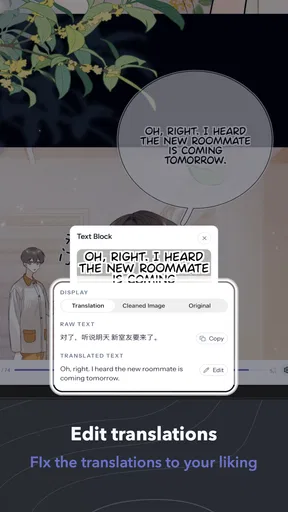
 Analysis by AppCompare
I would treat OpenToon as a focused reading aid, not a magic switch that makes every comic effortless. Its strongest case is simple: when dialogue is the barrier, a tool built around translating manhwa and webtoons can be more convenient than juggling a comic reader and a separate translator. The details that matter most are practical ones—where you read, how steady your connection is, and how much you care about polished wording.
Try it with a chapter that tests your real needs
Before making it part of your routine, I’d choose a chapter with a mix of ordinary dialogue and a few visually busy panels. That gives a better sense of whether the translation helps with the material you actually enjoy, rather than judging it from one simple exchange. If a scene is difficult to follow, compare its dialogue with the sequence of panels around it; that can reveal whether the issue is an awkward translation, stylized lettering, or simply a story that depends on context.
This is also a useful way to decide whether it deserves a place alongside your usual reader. If you only need help once in a while, switching to a general translation tool for an occasional panel may be enough. If language blocks you repeatedly across chapters, keeping the translation workflow closer to the comic may save enough effort to matter.
Reading in brief sessions calls for a slightly different approach from settling in for a long chapter. I’d pause at a natural scene break before putting the phone away, rather than stop in the middle of a conversation. That makes it easier to resume later without having to reconstruct who was speaking or why a reaction matters. It is a small reading habit, but one that helps when network delays or daily interruptions break up a session.
Readers who mainly want to discover new series should keep their expectations separate from the translation task. OpenToon’s appeal is understanding a comic, not serving as a substitute for every feature of a dedicated discovery platform. I would choose a conventional comics service when a broad, organized library and professionally edited translations are the priorities; I would choose this app when the immediate problem is making sense of a manhwa or webtoon already on my screen.
For someone deciding whether to spend, I’d first work out what they want the purchase to change. The free starting point makes it possible to judge whether the reading workflow suits them, while the listed in-app items span from $2.99 to $119.99. I would inspect the specific item and its terms before paying, and avoid assuming that a purchase will improve reception, remove every translation snag, or provide a particular result unless its description says so.
My clearest recommendation is for a reader who encounters language barriers often, is comfortable reading on a phone, and can usually use the app with a dependable connection. Someone who needs exact literary phrasing, reads mostly in dead zones, or wants a polished official edition is better served by another option. That distinction is more useful than asking whether a translation app is universally good: the right choice depends on whether convenience outweighs the compromises for your own comics.
Worth Reading Before You Choose

Flipboard Shows What News Apps Must Do Beyond the Feed

Switching to Android Auto Means Rethinking Your Driving Routine

Google Calendar Makes a Crowded Week Easier to Manage

Ludo King Makes the Most of the Minutes Between Plans

Baby Panda World Brings Quick Play to Modern Phones, but Its Game Library Feels Busy

ESPN’s Live Game View Makes Following Close Games Easier
Reading a comic in a language I don’t know can turn a relaxing break into a string of guesses. OpenToon is built around that specific problem: it is a comics app from OpenNovel that translates manhwa and webtoons. I found its appeal easiest to understand as a practical bridge between a reader and panels they would otherwise have to skip—not as a replacement for a full-featured comic library or a language-learning tool.
The distinction matters. If you already read comfortably in the language of your favorite series, a translation-focused app may add little to your routine. But if a page’s dialogue is the obstacle, OpenToon puts that obstacle at the center of the experience. Its usefulness depends not only on how it handles a page, but also on whether your phone can stay connected when you want to read.
Translation works best when your connection keeps up
I’d judge a translation reader by what happens when I move between a strong connection and a weak one, not just by how it handles a smooth session. That distinction matters most when a chapter is split across short breaks: I can choose a sensible stopping point and avoid losing the thread if the page stalls. It also shapes how I’d plan to use the app away from home.
A useful bridge, with network-shaped limits
Because the app’s central purpose is translating comics, a dependable connection is an important part of the reading experience. That is especially noticeable when you open a new chapter or want to make sense of a panel while moving between places. I would plan to use it where my connection is reasonably stable rather than assume it will behave like a comic reader that has already saved everything for later.
This changes how I would approach a reading session. At home or on a reliable public network, I can focus on following the story and checking the translated text as I go. During a commute with patchy reception, the same task can become stop-and-start. If you are about to travel, it is sensible to check that the pages you need are available before you lose reliable access, rather than discovering a connection problem halfway through a chapter.
I would also separate two situations that are easy to confuse: being able to open a comic and being able to get its text translated. A page that is visible does not automatically mean every part of the translation process will be equally smooth in weak-network conditions. For readers who need translation at the moment they encounter each panel, this is a real trade-off, not a minor technical detail.
Reading on a phone, one panel at a time
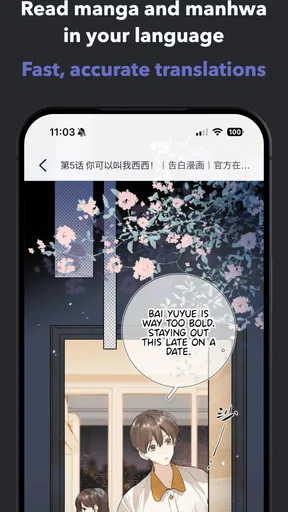
Manhwa and webtoons are naturally suited to scrolling on a phone, and that format makes a translation tool feel most useful when I’m reading in short stretches. Waiting for a coffee, taking a break, or following a chapter before bed are realistic moments when I might want to understand dialogue without switching repeatedly between a comic and a separate translation app.
That single-device workflow is the strongest reason I would try OpenToon instead of relying on general-purpose translation tools. With a separate tool, I may need to capture a panel, move between apps, or lose my place in the story. A comic translator is more directly aimed at the reading task. Still, the experience depends on how well the translated result fits the page: dense dialogue, stylized lettering, sound effects, and text placed over artwork can all make a panel harder to interpret than ordinary prose.
My practical tip is to read a little more slowly than usual when a scene matters. Check the surrounding panels before deciding what a short line means, especially when a character’s reaction seems disconnected from the dialogue. Translation can help make a story accessible, but context remains valuable; a line by itself may not carry the same nuance as the full exchange.
When something stalls, keep your place and retry deliberately
A connection hiccup is particularly frustrating when it interrupts the moment you are trying to understand. Rather than repeatedly tapping or reopening the same page, I would first check whether the connection has returned, then try the translation again. If the page is still unclear, moving on and coming back after the network stabilizes is often less disruptive than treating every delay as a problem with the comic itself.
It also helps to remember where the story stopped. A brief note about the chapter or the last panel you understood can save time if you have to leave the app and return later. This is a small habit, but it matters when reading in fragments throughout the day, particularly if a chapter’s meaning depends on a conversation that was interrupted.
There is a limit to what I would expect from any translation-first reader: translated wording may not preserve every joke, tone, or cultural reference. When a sentence sounds awkward, I would use the surrounding scene to infer the intent rather than assume the story itself is poorly written. Readers who need precise literary phrasing or polished localization may be happier with an official edition in a language they read fluently.
Use it thoughtfully when data matters
If you are reading on mobile data, it is worth being intentional about how long you spend browsing and translating. I would avoid leaving a chapter open and repeatedly retrying during a weak-signal stretch, since that can make the session both slower and more frustrating. When a trusted Wi-Fi connection is available, it is a sensible place to explore how the app fits your reading habits before relying on it while out.
OpenToon is free to install, but it includes in-app purchases, with items ranging from $2.99 to $119.99. That makes it worth checking the purchase details shown in the app before spending, particularly if you are only testing whether translation suits the kinds of comics you read. I would start with a modest trial of the reading workflow and decide from actual use, rather than assume that paying will solve connection issues or guarantee a particular translation result.
For younger readers, the content rating is Everyone, but that is not a substitute for choosing comics thoughtfully. The app is a translation tool for a broad comic format, and the subject matter of individual stories can still vary. If a child will use it, I would help them select appropriate reading material and make sure purchases are understood before they explore on their own.
Where it fits among comic and translation alternatives
The main alternative is not one single app. It is the combination of a regular comic reader and a separate camera or text translator. That approach can be flexible, but it adds steps and makes it easier to lose your place. OpenToon’s focused purpose is more appealing when the thing you want is to read a manhwa or webtoon and understand its dialogue in the same general workflow.
A conventional comic platform is the better choice if your priority is a curated library, a familiar reading experience, or official translations that have been edited for natural phrasing. A general translator may suit someone who only needs to decipher an occasional panel and does not want another comics app. OpenToon makes most sense in between: for readers who regularly encounter comics they cannot comfortably read and value convenience enough to accept the compromises of machine-assisted translation.
That comparison also helps set expectations. I would not choose it solely because I want a place to discover every series, nor would I treat it as a guaranteed solution for every lettering style. Its value is narrower and more concrete: reducing the effort between seeing a panel and understanding what the characters are saying.
Who I’d recommend it to
I would suggest OpenToon to a webtoon reader who often finds appealing stories but gets blocked by the language. It is also a reasonable option for someone who prefers reading on a phone and wants a more direct route than copying text into another app. OpenNovel has positioned it as a comics app rather than a general translation utility, and that focus is the point for readers with this specific need.
I would steer away from it if you need uninterrupted reading in places where your connection is unreliable, if you expect publication-quality localization, or if your main goal is simply to browse a large catalog of comics. In those cases, a standard reader with a translation you already understand—or a separate tool you trust—may be less frustrating.
The app is free, carries an average rating of 4.5 from around 5,000 ratings, and has more than 50,000 installs. It is rated for Everyone, and its current version is 1.1.4. It was released on May 24, 2026, and requires Android 10 or later. Those details make it approachable to try, while the optional purchases mean I would still look carefully at what an item offers before buying.
My connectivity verdict
OpenToon is most convincing when I can give it a steady connection and want to follow a comic without constantly switching tools. Its focused approach can make reading an unfamiliar-language webtoon feel less like troubleshooting and more like enjoying the story. The trade-off is that network interruptions and imperfect interpretation can break that flow, so I would not depend on it as my only option for offline travel or for close reading where every phrase needs to be exact.
For a connected, casual reading session, I’d give it a try—especially if language is the one thing keeping you from enjoying manhwa and webtoons. I’d test it on a chapter I’m curious about, pay attention to how it handles the kinds of pages I actually read, and keep a more dependable alternative in mind for weak-signal situations. That is a fair way to see whether its convenience outweighs its limits for your own reading habits.
Pros
- Translates text directly from manga images
- preserving the original artwork.
- Useful for understanding dialogue without manually copying text.
- Supports a range of languages for reading comics from different regions.
- Can make foreign-language manga more accessible to casual readers.
- A handy option for readers who want quick
- on-page translations.
Cons
- Translation quality may vary with language pairs and context.
- Stylized lettering or complex fonts can be difficult to recognize.
- Vertical text and crowded speech bubbles may lead to detection errors.
- Text embedded in detailed artwork can produce imperfect results.
- Some features or usage limits may depend on the app’s plan or version.
FAQs for OpenToon - Manga Translator
What is OpenToon - Manga Translator?
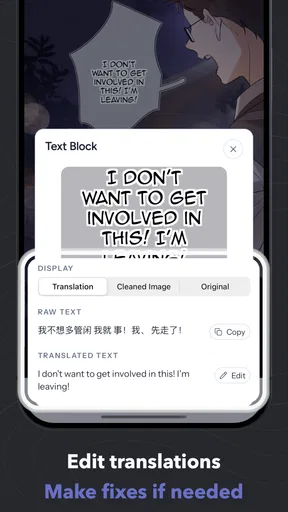
OpenToon - Manga Translator is an app intended to help readers translate text in manga, comics, or other illustrated pages. Depending on the version and available features, it may use image recognition to detect dialogue and display a translated version. Translation quality can vary with image clarity, lettering style, language pair, and text layout, so it is best viewed as a reading aid rather than a guaranteed replacement for a human translator.
How do I translate a manga page with OpenToon?
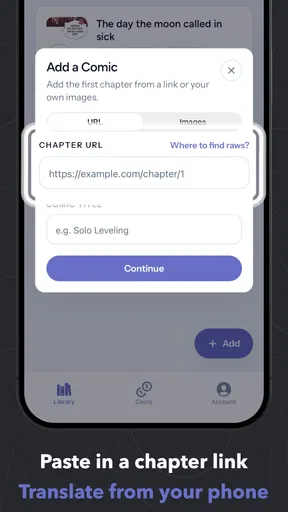
The usual process is to open or import an image containing the page, choose the source and target languages when those options are available, and start the translation. The app then needs to recognize the writing before it can translate it. Clear, high-resolution pages with unobstructed text generally work better than blurry scans, stylized lettering, or pages with overlapping artwork. Exact steps and supported inputs may differ by app version.
Which languages does OpenToon support?
Supported languages can depend on the app version and the translation service it uses. Before relying on OpenToon for a particular manga, check the language choices shown in the app’s settings or store listing, especially if you need a less common language. Also keep in mind that recognizing the original text and translating it are separate steps, and accuracy may be weaker for uncommon scripts, unusual fonts, or mixed-language pages.
Is OpenToon free, and does it require an internet connection?
Pricing and connectivity requirements can change, so check the current Google Play or App Store listing and the app itself before downloading. Some translation apps offer basic features for free while placing limits or advanced tools behind a subscription or in-app purchase. Image recognition or translation may require an internet connection, particularly when processing is handled online; avoid assuming that offline translation is available unless the app explicitly says so.
Is it safe to upload manga images to OpenToon?
If translation involves online processing, the images you submit may be sent to the developer’s or a third-party service’s servers. Review the app’s privacy policy and store-page disclosures to understand how images and other data are handled, stored, or shared. Be mindful of copyrighted material and avoid uploading sensitive images. Download the app only from an official store, and review requested permissions before granting access to photos or files.


